Steps to Change Site's IP Address in VPS server
Once your Server Setup is Complete Please use the Below Given Method to change the Site's Ip address.
1.Login in your VPS server with Root access (WHM).
2. Go to search bar and type "Change Site’s IP Address" and Open it.
3. After opening this type your domain name in the search bar, use checkmark on Domain.

5. Then click On Change. Dropdown the IP menu to Assign New IP for your website.
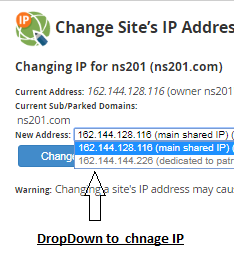
6. Click on the New IP and then Save.